
Download Acala Screen Recorder – screen recorder, video recording, desktop recording, tutorial recording, audio recording, cursor tracking, video editing, video capture, screen capture, video tutorial
Overview
Acala Screen Recorder is a dedicated desktop recording tool designed to capture screen activity with precision and ease. Its primary purpose is to enable users to record their computer’s display, including cursor movements, system audio, and selected screen regions, making it a valuable asset for creating instructional content, software demonstrations, and video tutorials. The app addresses common challenges in digital content creation by offering reliable screen capture functionality without requiring advanced technical skills. It is particularly useful for educators, trainers, software developers, and content creators who need to produce high-quality visual guides.
Target users include professionals seeking to document workflows, online instructors preparing lesson materials, and individuals creating step-by-step guides for software or applications. The developer, Acala Software, has positioned this tool within the productivity category, emphasizing efficiency and usability. Although specific background details about the company are not provided, the app’s long-standing presence in the market since its release on December 14, 2013, suggests a stable and functional product. Real-world use cases include recording live coding sessions, documenting software bugs, or creating marketing videos for digital products. In the broader app ecosystem, Acala Screen Recorder fills a niche for lightweight yet capable screen recording utilities, offering a focused solution for users who prioritize simplicity and compatibility over complex editing features.
Key Features & Functionality
- Multiple Video Formats Support: Acala Screen Recorder allows users to export recordings in widely used formats such as DivX, XviD, MPEG, and WMV. This flexibility ensures compatibility across various devices and platforms, enabling seamless sharing and playback without the need for additional conversion tools.
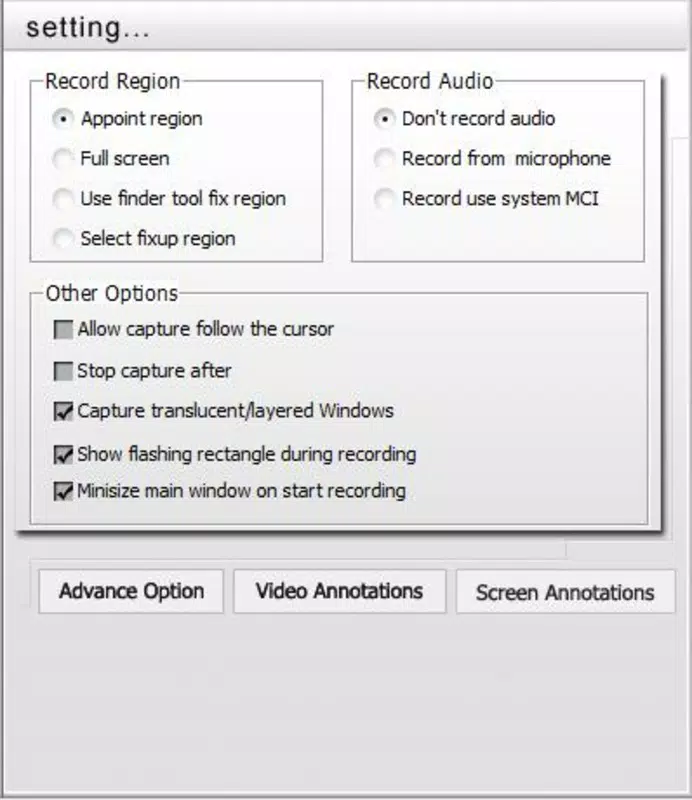
- Custom Recording Area Selection: Users can define the exact portion of the screen to record—whether it’s a single window, a specific region, or the entire desktop. This feature enhances focus and reduces file size by eliminating unnecessary visual content.
- Cursor Movement Capture: The software automatically tracks and records mouse movements and clicks, which is essential for creating clear, step-by-step tutorials where visual guidance is critical for user comprehension.
- Audio Recording from System Playback: It captures audio output from the computer, allowing users to narrate their screen actions or include background music during recordings. This feature is ideal for producing engaging and informative video content.
- Intuitive User Interface: Designed with accessibility in mind, the interface is straightforward and minimizes the learning curve, enabling both beginners and experienced users to start recording quickly and efficiently.
For example, a teacher can use the custom recording area to focus only on a specific application window while narrating instructions, ensuring clarity and minimizing distractions. Similarly, a developer might record a bug demonstration by selecting just the relevant portion of the screen and including voice commentary for better context.
Interface, UX & Performance
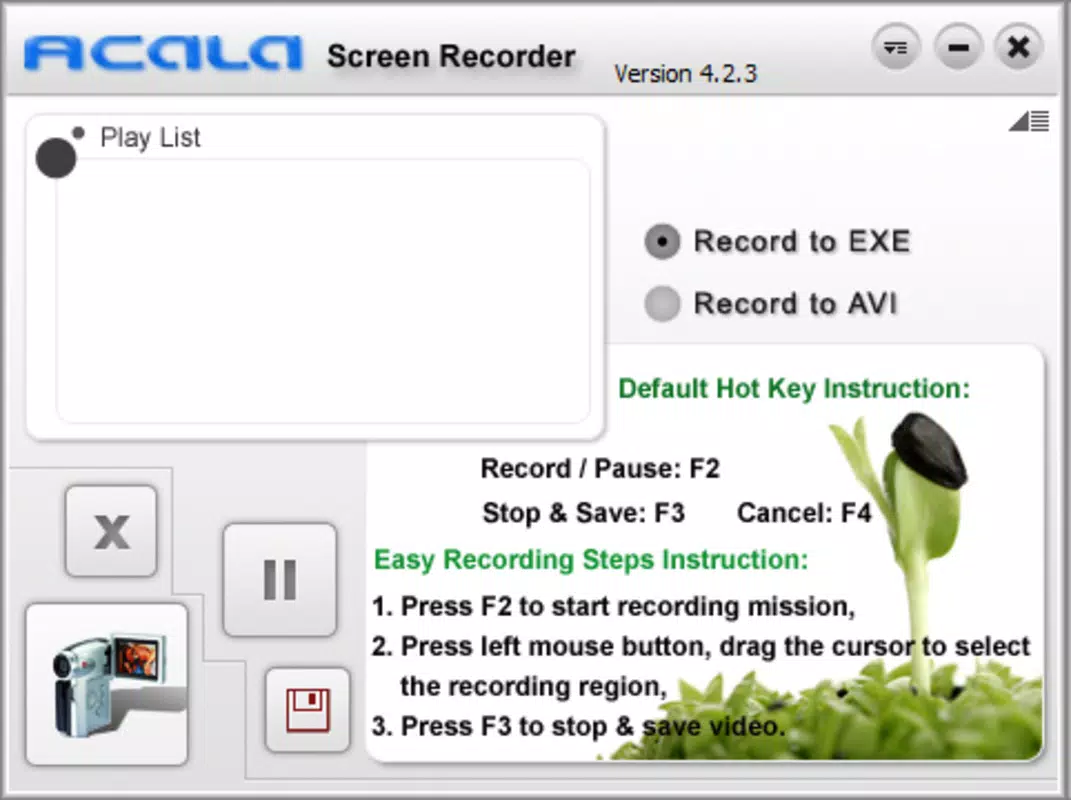
The user interface of Acala Screen Recorder is designed for simplicity and direct access to core functions. It presents essential controls—such as start, stop, and recording area selection—in a clean, uncluttered layout. Navigation is straightforward, with minimal steps required to begin a recording session. The visual style is functional rather than flashy, prioritizing usability over aesthetic embellishments.
Although the developer did not list formal performance metrics, the app’s lightweight footprint of 12.2 MB suggests efficient resource usage. It is expected to operate smoothly on standard desktop systems, though performance may vary depending on hardware specifications and background processes. Responsiveness during recording is likely consistent, given the app’s focus on real-time capture.
Stability appears reliable, especially considering its release date and continued availability. However, specific details on compatibility with modern Windows versions or support for high-resolution displays were not disclosed. Users should expect a stable experience, but may need to verify functionality on newer operating systems.
Platform Compatibility & Technical Requirements
Acala Screen Recorder is designed for the Windows platform and is compatible with various Windows operating systems. The current version is 3.3.0.2, with a file size of 12.2 MB. While the app has been available since 2013, the developer did not specify minimum OS requirements or detailed compatibility information.
This lack of clarity may affect users running newer versions of Windows, particularly those with updated security protocols or display scaling features. The absence of information regarding system architecture (e.g., 32-bit vs. 64-bit) or required hardware components limits the ability to assess full compatibility.
Users should proceed with caution and ensure their system meets general Windows desktop requirements before installation.
Pros and Cons
Pros
- Supports multiple video formats for broad compatibility
- Allows precise selection of recording areas for focused content
- Tracks cursor movements effectively for tutorial clarity
- Records system audio for enhanced video presentations
- Features a user-friendly interface suitable for beginners
Cons
- Developer did not provide detailed system requirements
- Compatibility with modern Windows versions is uncertain
- No information on update frequency or future development
- Price point of $29.95 may be high for casual users
- File size and version data suggest an older release
FAQ
Is Acala Screen Recorder safe to download and install?
Yes, the app is a legitimate tool developed by Acala Software. However, users should download it only from official or trusted sources to avoid potential security risks.
Can I record audio along with my screen?
Yes, Acala Screen Recorder captures audio playback from the computer, allowing users to include narration or background sound in their recordings.
Does it support recording only a specific window or region?
Yes, users can select a custom recording area, including individual windows or a defined portion of the screen.
What video formats does it support?
The app supports popular formats such as DivX, XviD, MPEG, and WMV, ensuring broad playback compatibility.
Is there a free version available?
No, the app is a paid tool with a price of $29.95. There is no publicly available free version or trial period mentioned.
Final Thoughts
Acala Screen Recorder remains a dependable option for users seeking a straightforward way to capture desktop activity with audio and cursor tracking. Its focus on core functionality—recording, formatting, and usability—makes it a practical tool for educators, trainers, and content creators. While the app’s age and lack of updated technical details raise questions about long-term compatibility, its proven features and consistent performance offer value for those who need a no-frills screen recording solution. The absence of a trial version and the relatively high price may deter some users, but for professionals who require reliable, format-flexible recordings, it presents a solid choice. For those in need of a dedicated desktop screen capture tool, Acala Screen Recorder delivers on its promise.
Download Acala Screen Recorder now


